
Onboarded + Sorted.
— For real estate agents who've been putting AI off — or using it and getting less-than-impressive results
I cut $80k a year in outsourcing with AI. It started with the setup.
Onboarded is the 90-minute setup that turns ChatGPT or Claude into an assistant that knows you, your business and market.
8
AI assistants
1,600
Homes sold
$100 million
A year GCI
90
Minutes
— What's included
ONBOARDED gets you ready for AI automation: a 90-minute setup that teaches ChatGPT or Claude how your business works.
SORTED ($47 value): Your next deal is already in your contacts. Sorted is an AI-powered course that pulls years of contacts out of your phone, inbox, and spreadsheets and puts them into one clean list in about 10 minutes. One agent did it in three.
You opened AI to save time. Then explained yourself. Again… and again!
Who you are. Where you sell. Who your clients are. How you write.
Then you get a draft that's too formal, too long, or sounds like every other agent on the internet.
You correct it. Explain it again. Eventually, you write the email yourself.
Or you get one great result — and can't figure out how to get it again.
Or you never opened it at all, because it looked like one more techy thing to learn.
AI is NOT a prompt machine. It's a teammate. And, like any great teammate, it needs to be Onboarded
— The difference the setup makes
Same CMA. Same request. Two very different emails.
Hand a blank AI your CMA and ask for your market update, and you get "the market is constantly evolving." Hand it to an onboarded assistant, and it reads the numbers, follows your template, and makes your case the way you would.
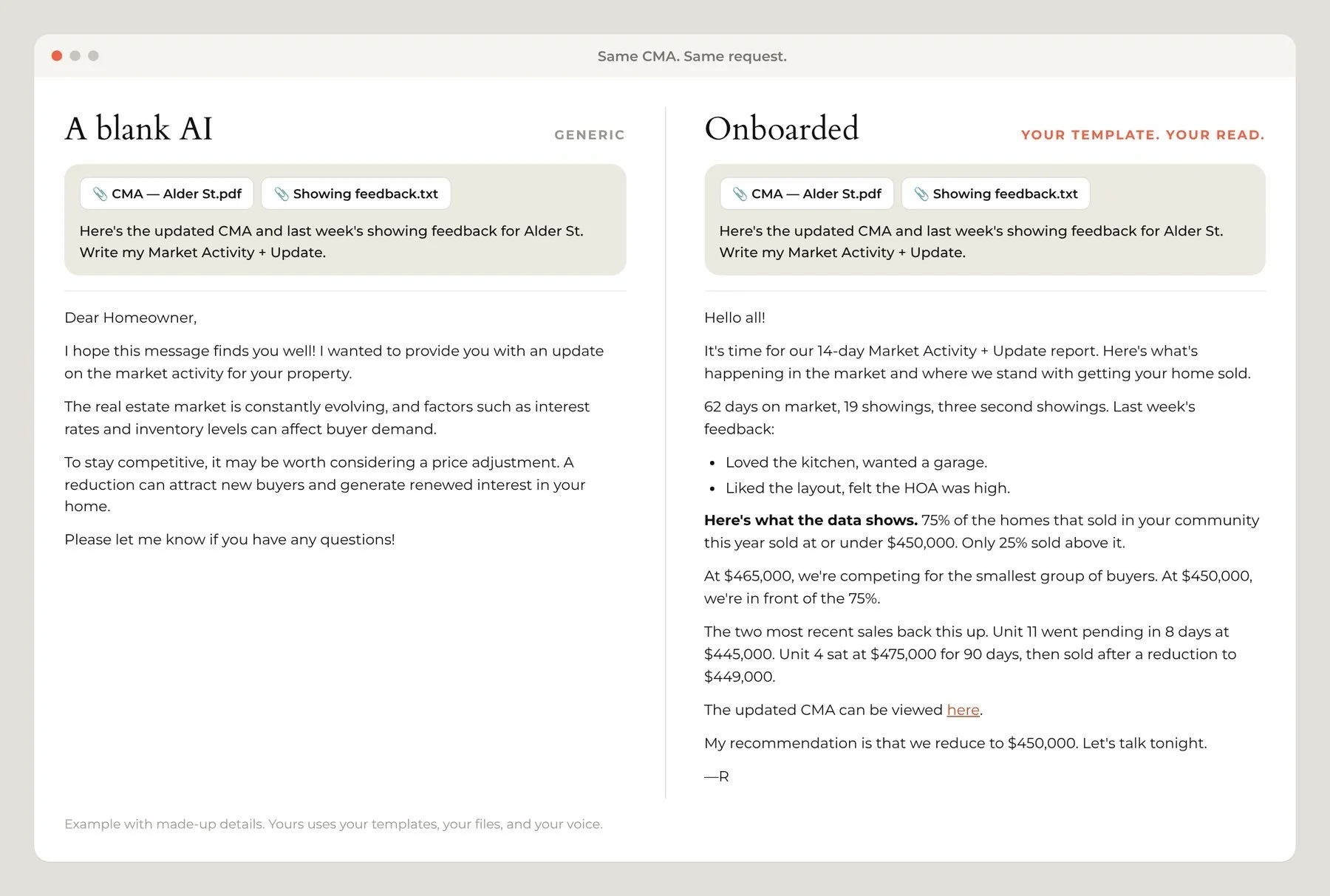
Example with made-up details. Yours uses your templates, your files, and your voice.
— How it works
Give your assistant what it needs to do the job.
You'd explain your business to a new assistant. Show them where things live. Walk them through how you work. Your AI needs that context, too. Onboarded walks you through giving it, in ChatGPT or Claude — one plain step at a time. For the biggest part, you just talk.
01
You talk.
Your AI interviews you about your business, your clients, and how you sound.
02
It saves your business.
Your answers become your Brand DNA + Voice File, Business Brief, and instructions.
03
You ask in one sentence.
No prompt formulas. Hand it a CMA, a voice memo, or your week.
04
It drafts. You decide.
Work comes back in your voice, ready for your review. Nothing goes out without you.
Set it once. Now every conversation you ever start already knows who you are, before you say a word.
A lot of people are collecting prompts right now and wondering why they're not working. Onboarded is the answer! They missed the setup but we're going to fix that.
— What you'll build
What you'll have in ChatGPT or Claude when you're done.
01
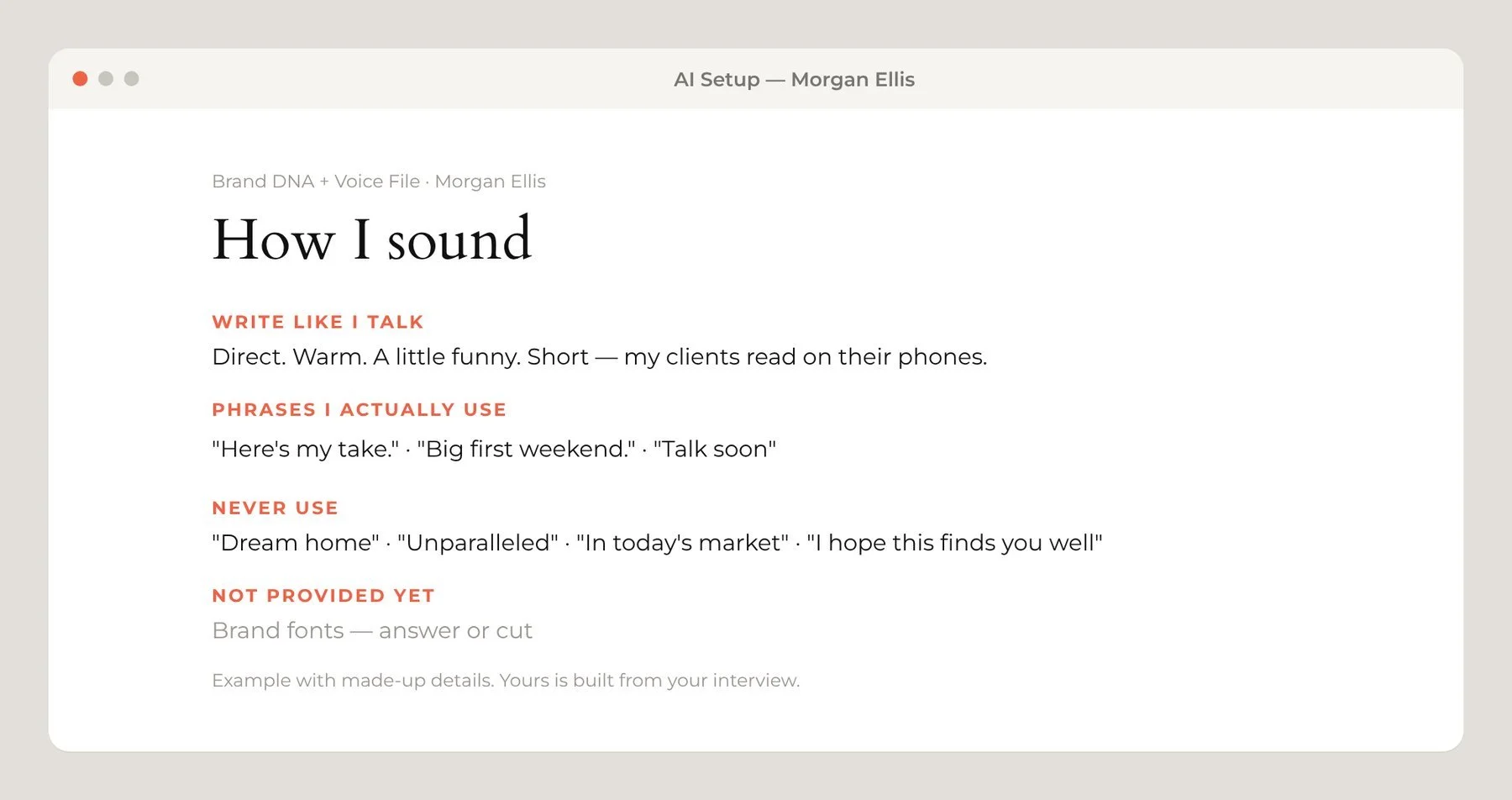
Your business and voice, documented.
Your AI interviews you, and you just talk. You leave with your Brand DNA + Voice File and your Business Brief.
02
Your business assistant, built and tested.
My Business Assistant holds your Brand DNA, your Business Brief, and your process checklists in one place. Every request comes back in your voice and on brand, without explaining yourself again.
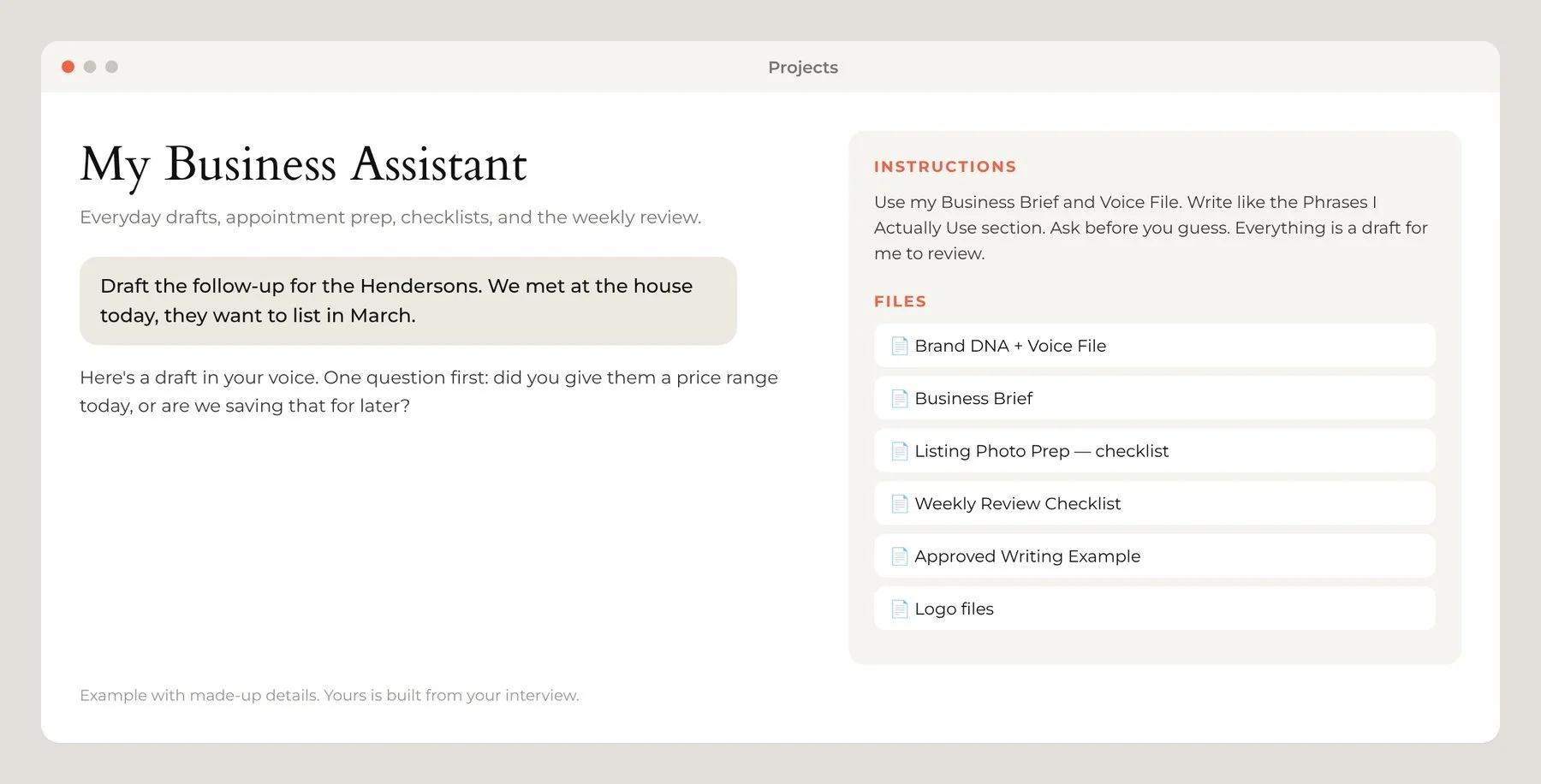
Examples with made-up details. Yours is built from your interview.
— Your week, after Onboarded
Sunday night. It's already done.
Once your email and calendar are connected, your Sunday Run is scheduled. My Business Assistant runs it every week on its own.
Your week comes back laid out. The double-booking on Tuesday. The showing on Thursday with no address. What to bring to each appointment.
The emails that need you, sorted. Your top five priorities. Three drafts, written the way you talk, waiting for your review.
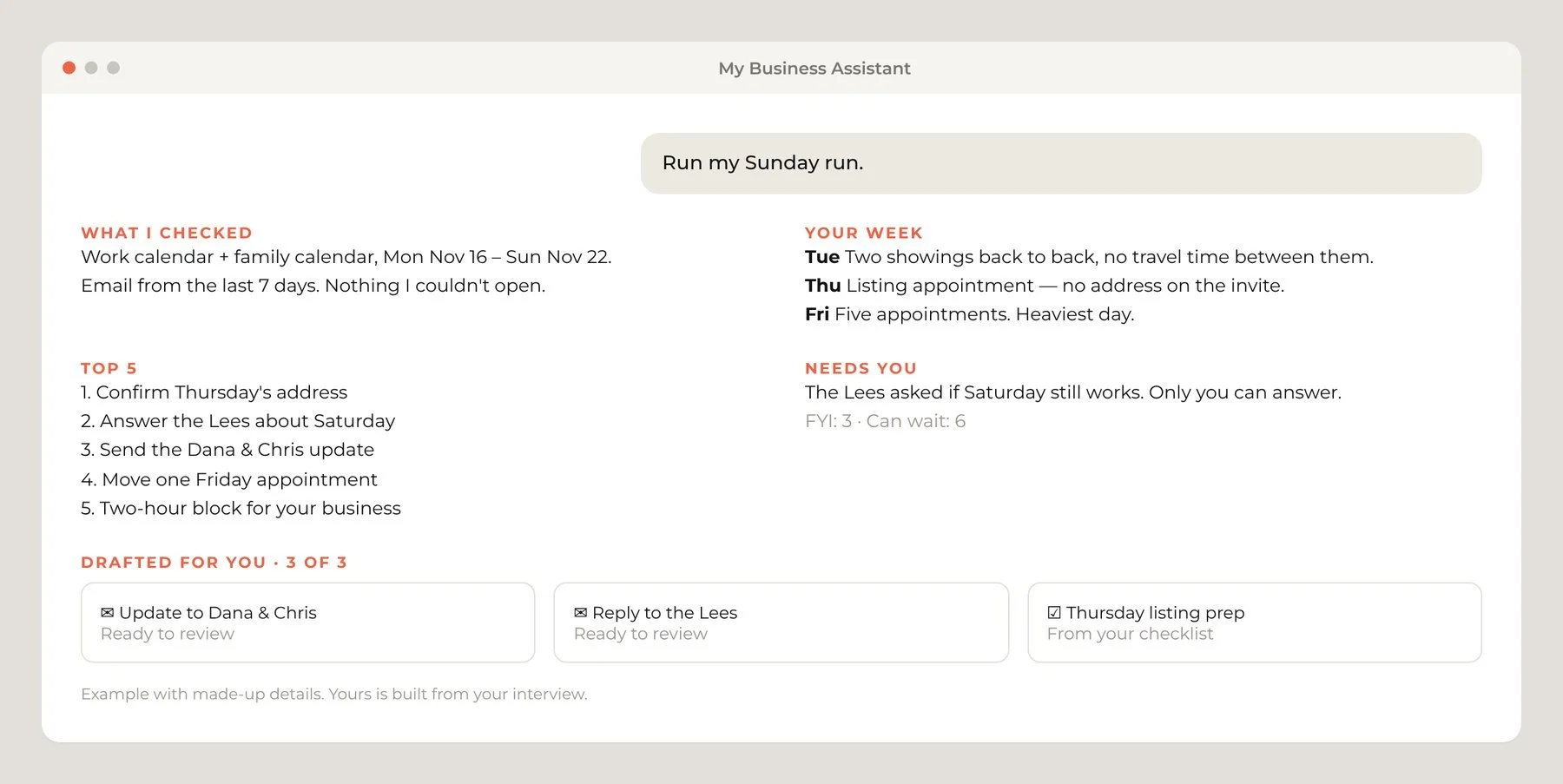
Example with made-up details.
You read them. You fix a line. You send what you approve.
— Then put it to work
Once it knows your brand, it builds on brand.
Every time: your colors, your font, your voice, the numbers you directed it to focus on. Ask for an Instagram carousel regarding current market stats. It comes back on brand.
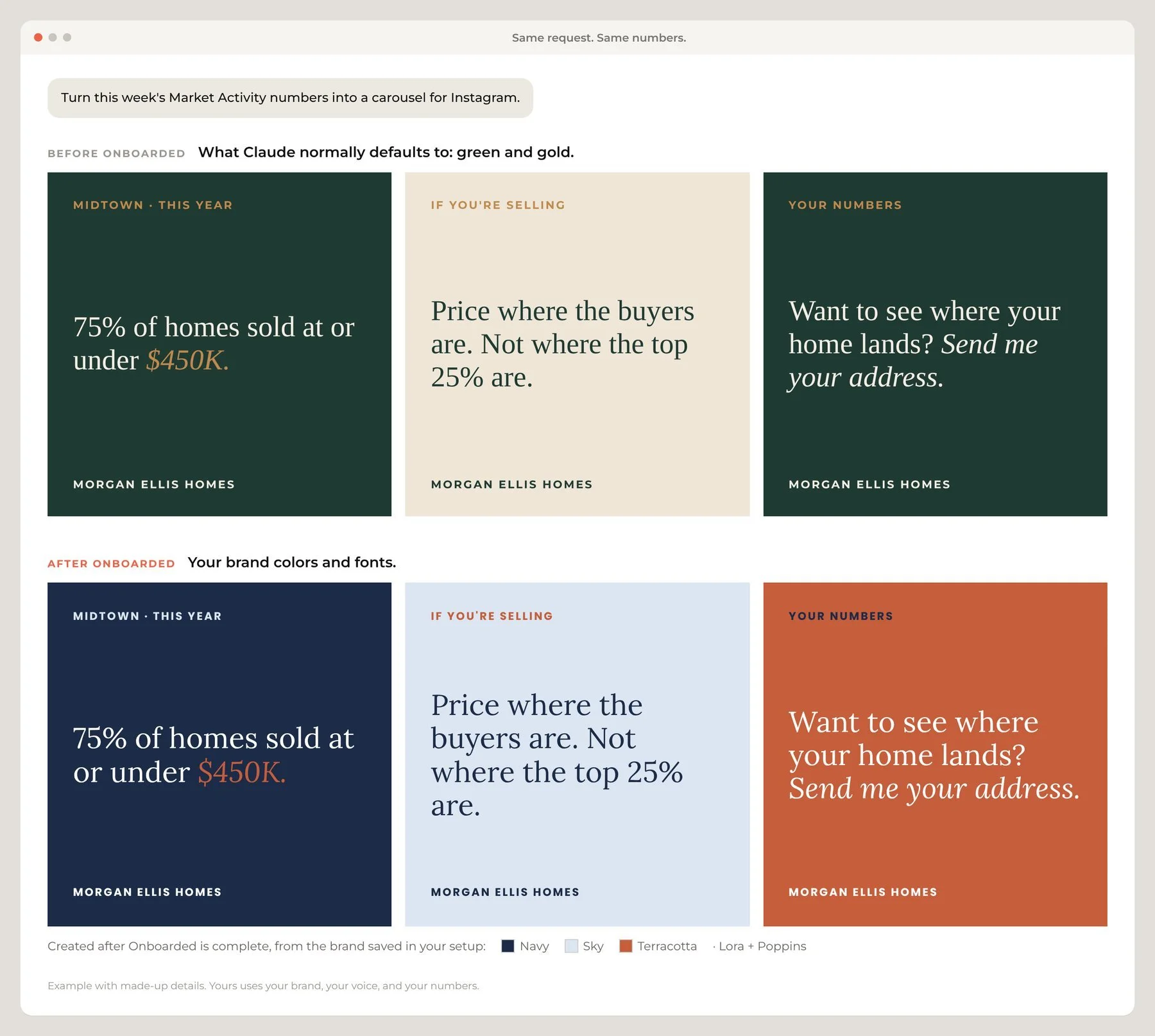
Once your setup's done, the possibilities are endless.
Use your new business assistant to make you AI findable as the best agent in your town.
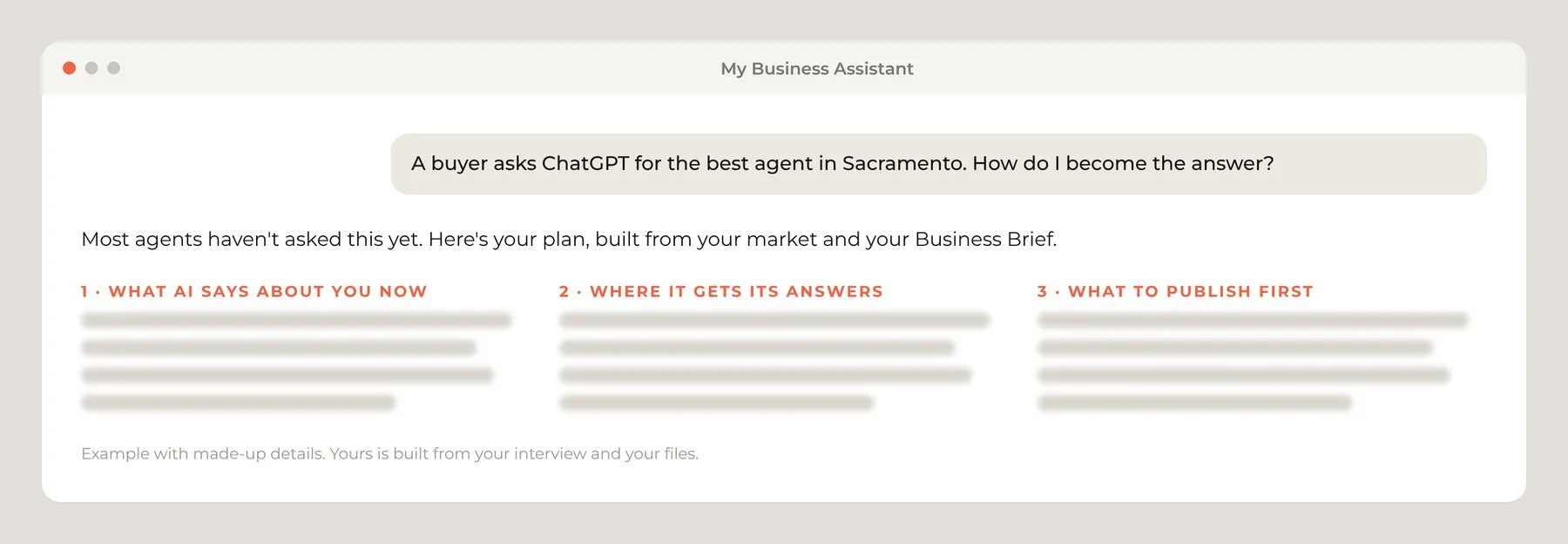
Example with made-up details. A preview of what's possible after the setup — not part of Onboarded.
What it is
+ A guided setup in ChatGPT or Claude, six steps
+ Your business, voice, and rules, saved once
+ Built and tested on your own real work
+ Beginners welcome — you mostly just talk
What it isn't
– A prompt pack you'll forget in a folder
– AI sending emails or changing your calendar for you
– Hours of videos to sit through
– My configured AI team — that's where it can go next
— Where it goes from here
Here's what my AI handles for me.
Tonight while I was making dinner, Claude was setting up my emails in Mailchimp, and ChatGPT was writing me a brief on weekend news with suggestions for social media posts.
At 6am, my AI Chief of Staff, Sam, will have an email waiting for me:
Status line — the shape of my day, and how many focused hours I have.
Handled — what Sam already did since yesterday.
Needs you — three things, max. Only what can't move without me.
Projects at a Glance — the next two or three things I need to get done to finish my projects.
The Tackle Pass — the top three things that get more expensive by waiting, and what Sam can take off my plate.
One for the Feed — one market story, and the content angle.
One Ask — one question for me.
Drafts for review — every reply Sam wrote, waiting for me to send.
The Read — the mail that got filed, summarized, so nothing important hides in a folder.

My AI team works really hard for me. Onboarded is where it starts.
— Six steps
Here's exactly what we'll do together.
Step 1
Set it all up
You leave with: Your AI settings turned on, one AI Setup folder on your computer for everything you build, and your email, calendar, and Drive connected so your AI can read them.
You'll feel: Relieved — every setting in one place.
Step 2
The interview
You leave with: An AI that knows your business and sounds like you. Your interview becomes three documents it reads before every request, so you never explain yourself again.
You'll feel: Heard. You just talked.
Step 3
Your first Project
You leave with: My Business Assistant, plus one documented, ready-for-AI process.
You'll feel: Organized.
Step 4
The Proof Run
You leave with: A real follow-up and to-do list from a quick voice note, built from the process you wrote in Step 3 — plus how long it would have taken you by hand.
You'll feel: The "oh" moment.
Step 5
Say it like you'd say it to an assistant
You'll feel: Confident asking for anything.
Step 6
Your first Sunday Run
You leave with: Your week, top priorities, and a first draft in one message. Bonus: the full run, saved and scheduled to run every week once your email and calendar are connected.
You'll feel: Ahead of your week, not behind it.
— Can you relate?
"I have been dreading AI. Thank you for breaking it down in such an easy way. This was fun!"
Erin B. · 20+ years in the business · Team lead
"I just used Claude to draft a response email to a seller of mine who is leaning towards not staging a vacant house... Claude's response was 100% spot on! And it neatly left it in my drafts for me to review! I love Claude!!! And you! Thank you so much for sharing all your tools with us every week!"
Yasmine F. · CEO Agent Academy member · 17 years in real estate · Solo agent

I know the work between the appointments.
I'm Rebecca Green, founder of Rebecca Green + Co. and the CEO Agent Academy. I've spent 35 years in real estate and personally sold more than 1,600 homes.
I know how quickly top-producing agents can become the ceiling in their own business by taking on every element of the job. I also know what happens when you jump into AI without the right foundation.
"I spent 500 hours unwinding the mistakes I made when I went straight to typing random prompts into a chat."
Onboarded brings the setup into one sequence you can follow.
Onboarded is for you if you've been putting AI off, keep getting generic results, or want a repeatable way to use it in your business.
Six months from now, AI is going to be even more advanced — and you're burnt out from still doing all the admin tasks yourself.
Your next 5 assistants are already here and ready for you to put them to work.
Actually, it's an infinite number. Name what you want an assistant for in your business right now, and AI can do it.
But you've got to get your setup done first.
Onboarded + Sorted.
$97 $144
$97 for Onboarded + Sorted, both courses. ($144 value: Onboarded $97 + Sorted $47.)
+ ONBOARDED gets you ready for AI automation: a 90-minute setup that teaches ChatGPT or Claude how your business works.
+ Sorted pulls years of contacts out of your phone, inbox, and spreadsheets and puts them into one clean list in about 10 minutes.
+ The Interview — your AI interviews you. You just talk.
+ Your Brand DNA + Voice File — who you serve and how you sound
+ Your Business Brief — how your business and your week actually run
+ My Business Assistant — your first Project, built and tested
+ Your Process Checklist — one of your jobs, written down for your assistant to follow
+ The Sunday Run — your week laid out, then scheduled to run every week once your email and calendar are connected
+ 10 plain-English requests — to put it to work this week
After getting set up correctly, I built AI assistants for graphic design, copywriting, social media, content ideas, chief of staff. Not only am I saving about $80k a year in outsourcing, I'm getting more done in infinitely less time.
It starts with the same setup. Onboarded + Sorted, both courses, is $97, once.
Works with ChatGPT or Claude. A paid plan is required, separate from the course.
Already in the CEO Agent Academy? Onboarded is included.
The guarantee
If you get this setup done and it's not making a difference, send me an email at rebecca@rebeccagreen.co and I'll jump on a call with you.
Grab a cup of coffee or a glass of wine and let's get to it!
AI is by far the most scalable, cost-effective assistant I have ever had. Can't beat the value!
Let's get weirdly efficient so we can work less and make more.
— Rebecca
— Questions
Before you start.
Should I use Claude or ChatGPT?
Either — or both. Finish the setup with one, then bring the same documents to the other.
I'm not techy. Can I actually do this?
If you can open a chat, copy and paste, and follow steps, yes. Every setting is in one place, with a check at the end of each step. The interview asks about the business you already know — you just talk.
I've tried ChatGPT. It sounded generic.
That's what the setup fixes. Your AI interviews you first, so it has your business and your voice before it writes for you.
What do I need?
A computer for setup, and a paid plan: Claude Pro or higher, or ChatGPT Plus or higher. The course walks through Google — Gmail, Calendar, and Drive.
What if I'm not on Google, or my brokerage blocks the connection?
You can still finish by uploading your documents and pasting in the email threads or schedule yourself. You won't get automatic inbox and calendar retrieval until a connection works.
Will it send emails or change my calendar?
No. It drafts. You send. Nothing in the course sends a message or changes your calendar.
Is my AI team included?
No. Those are my own configured systems. Onboarded builds the foundation and your first Sunday Run.
How long does it take?
About 90 minutes, at your own pace.
How fast will I see a difference?
The same day. In the Proof Run, you talk through something that just happened and get back a follow-up you'd actually send, plus your to-do list.
Will it work for my market?
Yes. The interview is about your market, your clients, and how you sound. Whatever you sell and wherever you sell it, your assistant builds from your answers.
Do I have to switch to Claude?
Honestly, I use both Claude and ChatGPT. You can have both working for you by the time you finish your morning coffee.
I already have a Brand DNA. Do I start over?
No. Bring it. The interview uses it and asks only for what's missing.
I've bought courses before and never finished them.
Six steps, one checkpoint each. You'll always know when a step is done.
I'm in the CEO Agent Academy. Do I need to buy this?
No. Onboarded is included in your membership.